Why doesn’t my thermostat go back to the schedule?
With Schedule On, Sensi controls your home based on your time and temperature settings in the current schedule. To temporarily change your temperature, use the up and down arrow buttons in the Sensi app or on the thermostat. Sensi will display “Temporarily Set To” on the thermostat and will hold your new temperature until the next scheduled set point with a minimum hold time of two hours.
End the Temporary Hold
At the thermostat
Sensi will return to your schedule on its own, but you can also manually cancel the temporary hold whenever you want on the Sensi thermostat or in the app. At the thermostat, simply toggle Schedule Off and then back On.
In the Sensi app
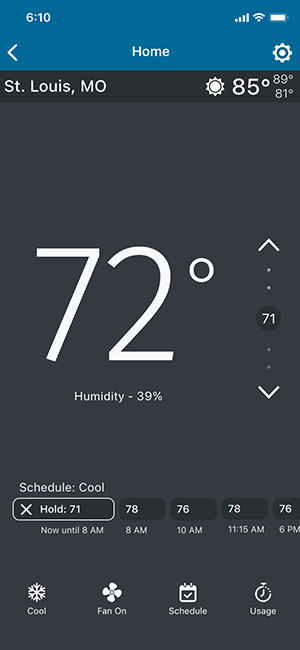
In the Sensi app, you’ll see a timeline of your schedule. If you currently have a temporary hold, you’ll see “Hold: __” and the hold temperature in your schedule timeline. For example, see the screenshot below. “Hold: 71”
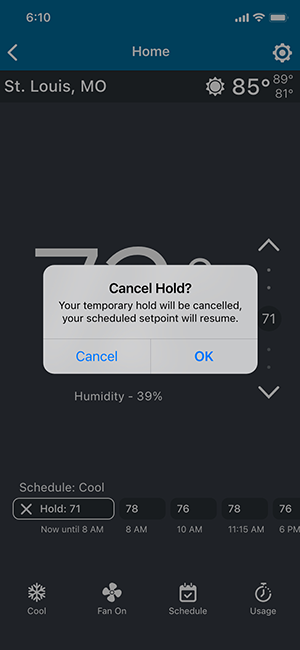
To cancel the hold, tap on the X in the hold square indicating your current set temperature. A dialog box will come up and ask if you want to end the hold. Tap OK to end the temporary hold and revert back to your normal schedule at any time.
 |
|
 |
Reach out to us
Our customer support is available 7 days a week.
