How do I use the wire picker in the Sensi mobile app?
To begin, look at the wires attached to your old thermostat base. Each wire should have a corresponding letter on the base. On your Sensi app, select each letter that corresponds to a connected wire on your old thermostat until all your wires are highlighted.
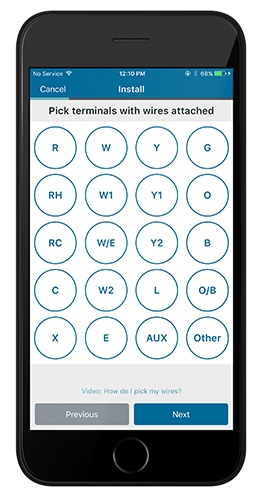
As you select your existing wires, nonessential wires will become disabled the on screen, narrowing down the possible combinations.
If you accidentally select the wrong wire, simply tap it again to cancel that selection.
When you are finished, you should receive an on-screen notification that you’ve entered a compatible configuration. If you do not see this message, take a moment to verify that you have selected each wire correctly.
If you are having issues with the wiring and are getting an invalid wiring configuration, then follow this link for more information. https://sensi.copeland.com/en-us/support/my-configuration-is-invalid
Reach out to us
Our customer support is available 7 days a week.
